

Minuteur QweQweQ Pro
Allant de 1 seconde à 12 heures.
Faites glisser la molette pour la position de départ à droite avec votre doigt.
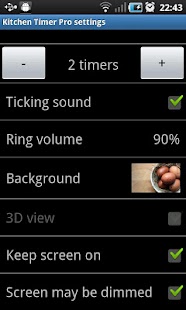
Appuyez sur le bouton menu pour entrer dans le menu des paramètres.Cette version pro supporte jusqu'à 4 minuteries simultanément.
Plus de 40 images de fond à choisir.
Prenez une photo du produit panoramique / vous êtes moment.
Peut aussi être utilisé comme retardateur de douche.
Peut être déplacé vers la carte SD.
User manual (English): http://qweqweq.com/applabs/pro.html
About Minuteur QweQweQ Pro
- Package name (App ID)
- com.qweqweq.kookwekkerpro
- Available on
- Google Play
- Price
- $1.49
- Developer
- QweQweQ AppLabs
Looking for the Minuteur QweQweQ Pro APK?
The safest way to get Minuteur QweQweQ Pro (com.qweqweq.kookwekkerpro) on your Android device is to install it directly from Google Play — you'll always get the latest official version, automatic updates, and no risk of modified or infected APK files from third-party sites.

Camera Features
Advanced camera features with editing capabilities.
Productivity Tools
Boost your productivity with powerful tools and features.
Automotive
Manage and monitor your vehicle with smart features.
Decouvrez Minuteur QweQweQ Pro en action

Ce que disent nos utilisateurs
Ne nous croyez pas sur parole. Voici ce que nos utilisateurs disent de cette application Android.
"My usual app failed at update, so tried this to get me by, complete waste of a £! Locks the app in landscape mode, seemed to be running fast, but I've not statistically checked that. I wanted to use it for the washing machine, but when you get that far up it's lazy and only jumps in 5 minute intervals! About to uninstall it after only a few hours of use, an expensive trial! Don't waste your time! ⌚"
"This function worked fine on my old phone but seems to be missing on my new one. This is because newer phones do not have menu buttons. The designers should really take this into account."
"When downloading, something went wrong, and I was prompted to take a refund. I'd rather the app; I need multiple timers. Please help. Note 2"
"This is a scam I bought this for more than 1 timer and I get just one..i already had that app which works very well but not this one..What the heck!!!I am livid!!!Asked for my money back but so far they haven`t responed..~poor customer service.."
"Works great and it's great to have 4 timers running at the same time. I take pictures of what I am timing so it is easy to remember which timer is going off."
"Like the multiple timer option which is why I installed. It just seems too easy though to adjust one of the "tapes" inadvertently; the lock function does not seem to prevent this. Pressing on the photo button can also result in moving the tape."
"Cool apps for anythiing u like to use timer"
":-)"
Frequently Asked Questions
Is Minuteur QweQweQ Pro free?
Minuteur QweQweQ Pro is a paid app — it costs $1.49 on Google Play. You pay once through your Google account and can install it on your Android devices.
How do I install Minuteur QweQweQ Pro on Android?
Open Google Play on your Android phone or tablet, search for Minuteur QweQweQ Pro by QweQweQ AppLabs or tap the Google Play button on this page, then tap Install. The app downloads and installs automatically.
What is com.qweqweq.kookwekkerpro?
com.qweqweq.kookwekkerpro is the App ID (package name) of Minuteur QweQweQ Pro on Google Play. Every Android app has a unique package name, and it is the safest way to verify you are installing the official app.
Is Minuteur QweQweQ Pro safe to download?
Installing Minuteur QweQweQ Pro from Google Play is the safest option: you get the official version published by QweQweQ AppLabs, verified by Google Play Protect, with automatic updates. Avoid APK files from unofficial third-party sites.

Get Minuteur QweQweQ Pro Today
Minuteur QweQweQ Pro for Android — $1.49 on Google Play.
Compatible with Android phones and tablets — available on Google Play.
Vous aimez cette appli ?
Partagez-la avec vos amis et votre famille sur votre reseau social prefere.
Posez vos questions a l'IA
Obtenez des reponses instantanees sur les fonctionnalites et astuces.